Apartment search
Apartment Hunting Spreadsheet: A Free Template That Keeps the Details Straight
Apartment hunting spreadsheet: download our free manual workbook for listings, costs, tours and follow-ups. From Fairway, the AI agent for renters.
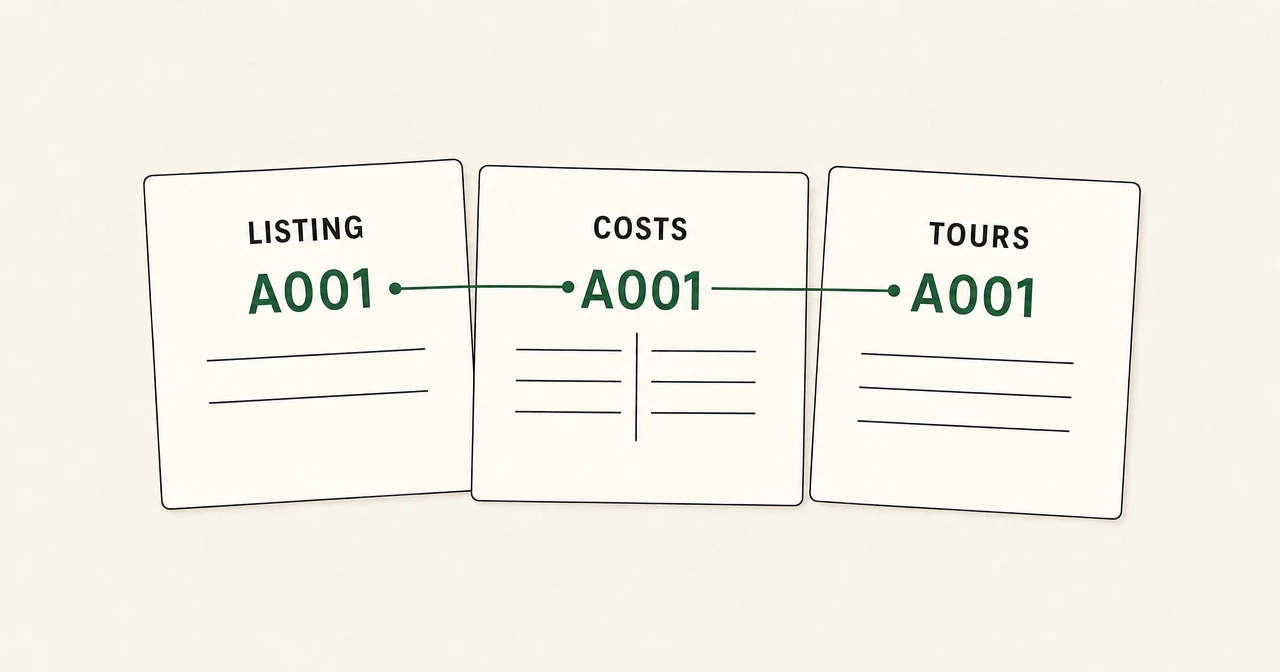
Three saved listings, two unanswered messages, and a tour you can remember but cannot quite place. Apartment hunting gets messy when every detail lives somewhere different. A spreadsheet gives each unit a home for its costs, open questions, and next action. Our free template keeps that work manageable, including the difference between a monthly bill and the cash needed to reach move-in day.
Download the apartment hunting spreadsheet
Download the free workbook as an Excel .xlsx file. It has four tabs and 30 blank rows in each working tab. Open it in Excel, or upload it to Google Drive and open it with Google Sheets. Converting it to native Sheets format creates a separate copy. Check the converted copy's formulas and layout before relying on it, then keep one working version so roommates are updating the same file.
This is a manual tracker with two cost-total formulas. It has no macros, live availability feed, listing imports, reminders, or apartment-ranking score. You enter the details and update them as your search changes.
A tracker also leaves the calls and scheduling with you. For help with that legwork, we're an AI agent for renters, free for renters. Tell us what you want, and we find matches, call landlords or leasing offices, and book tours. The workbook remains a separate tool you control.
Get to know the four tabs
| Tab | What belongs here | When to use it |
|---|---|---|
| Notes | Field definitions, cost-entry rules, and privacy guidance | Start here, and return when a payment or field is unclear |
| Listings | The exact unit, source URL, must-have fit, search status, and next action | Add a unit once it becomes a real option |
| Costs | Recurring monthly costs, cash paid or due through key handover, and the basis for those amounts | Update after a quote or fee answer arrives |
| Tours & Follow-ups | Contacts, tour details, observations, unanswered questions, and action owners | Add a row for a contact, tour, or follow-up you want to remember |
Use the same self-chosen Listing ID across the three working tabs. A001 can identify one exact apartment, including its unit number. That ID connects its listing row to its cost row and any number of contact or tour rows. The connection is manual; entering an ID does not pull information into another tab.
Two advertisements for the same physical unit get one ID. Keep the main listing URL as plain text in Listing URL (plain text), and put an alternate source in Notes. Two different units in the same building get different IDs, even if the photos look identical.
Make each listing row useful
The Listings tab is your short overview. Start with Apartment / address / unit, Neighborhood, Available date, and Lease months. The notes field can hold bedrooms, bathrooms, square footage, floor, laundry, or other details important to you. Preserve the quoted unit and lease term so you do not compare one unit's price with another unit's features.
For Must-have fit, use a short judgment with a reason:
Fits: cat allowed; elevator; move-in date worksOpen question: assigned parking availabilityDoesn't fit: stairs are the only entrance
These are examples you can type, not a built-in scoring system. A missing answer stays an open question. It does not quietly become a yes. Your preferences determine the fit; the workbook does not choose an apartment for you.
Enter Commute minutes with context in Notes, such as 35 minutes by bus, weekday morning estimate. Keep estimates distinct from trips you actually made. For broader budget and search planning, our apartment hunting tips cover the process beyond the tracker.
Use consistent Search status labels, such as Saved, Contacted, Tour scheduled, Toured, Applied, Ruled out, or Unavailable. Keep a ruled-out row if its notes explain why you passed. Otherwise, the same apartment can return a week later wearing a new listing photo.
Finish every active row with three fields:
- Last checked: the date the listing details were last reviewed.
- Next action: one specific task, such as
Ask whether the parking space is assigned. - Action due date: the date you plan to do it, or the exact deadline the property supplied.
Enter dates as readable plain text in one consistent format, such as 2026-10-22. Add a time and time zone for time-specific events. The workbook does not calculate deadlines or send alerts. Calendar reminders, if you use them, live separately.
Keep monthly costs separate from handover cash
The Costs tab answers two different questions:
- Monthly estimate: What recurring amount does this apartment require each month, using the amounts you entered?
- Upfront cash estimate: How much cash has been paid or will be due through key handover?
Key handover is the cutoff when you receive the keys. The upfront total includes money already paid, so it is not the remaining balance you still owe. Record paid amounts, remaining amounts, and due dates in Confirmation source / notes.
Do not add the two totals together. Rent paid before handover can also be the rent represented in the monthly comparison. Adding a monthly estimate to handover cash can count that rent twice.
The seven recurring monthly inputs
Columns B through H contain:
- Base rent / month: the recurring rent for the exact unit and lease term.
- Required fees / month: required recurring charges not already included elsewhere.
- Utilities / month: your monthly utility amount, including an estimate when actual usage is unknown.
- Parking / month: the parking cost that applies to your plan.
- Pet costs / month: recurring pet charges, separate from any upfront pet payment.
- Insurance / month: the monthly renters insurance amount.
- Other costs / month: other recurring costs you are including in the comparison.
Assign each recurring charge once. If water is included in base rent, it is not an extra utility charge. If a required package fee is in Required fees / month, it does not also belong in Other costs / month. List bundled charges in the source notes so their treatment stays clear.
Our apartment utility cost guide can help put a utility estimate in context. A broad estimate remains an estimate for your particular unit.
Concessions need a note of their own. Keep the regular rent amount in the recurring comparison and record any free-month or credit schedule separately. This workbook does not calculate an effective lease-wide average or apply promotional credits automatically.
The five upfront cash inputs
Columns K through O contain:
| Field | What to enter |
|---|---|
| Application / screening cash | Application or screening cash paid or due for this option |
| Other nonrefundable upfront fees | Other upfront fees treated as nonrefundable in the stated terms |
| Refundable cash held | Deposits or other cash held under stated refund terms, kept separate from fees |
| Rent cash through handover | Total rent paid or due by handover, whether prorated, prepaid, or otherwise scheduled |
| Other upfront cash | Other cash paid or due by the cutoff, such as a setup charge you include |
Enter the actual stated payment schedule. Rent cash through handover is not automatically “one extra month's rent.” It might include a partial month, a full month, or additional prepaid rent.
A refundable deposit still ties up cash. Keeping it in its own column shows that it differs from a fee; the workbook does not promise a refund or predict deductions. Moving or setup costs due after handover fall outside this total and can go in the notes for your wider budget.
Unknown is different from zero
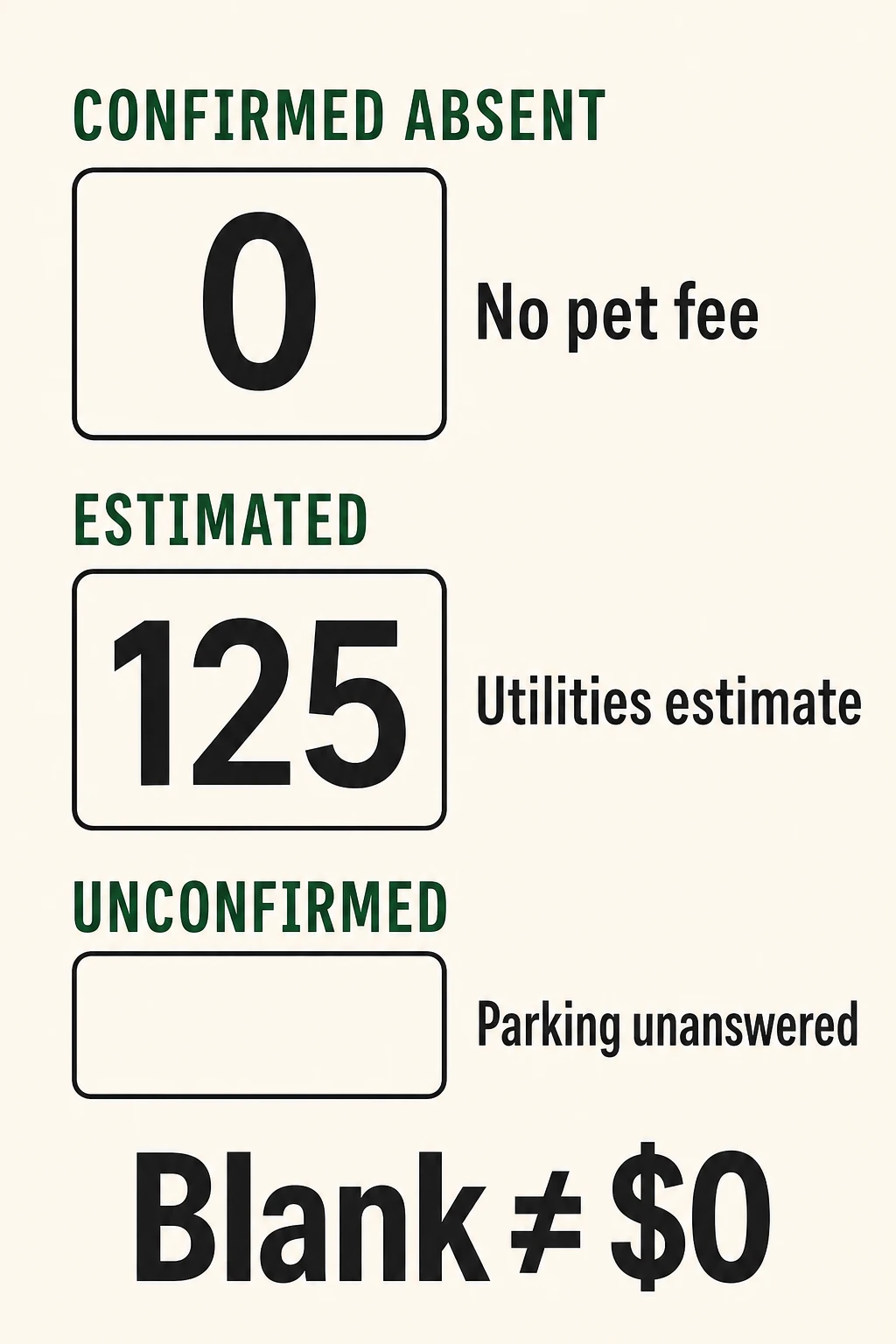
An empty cost cell means you do not know the amount. Numeric 0 means the charge is confirmed not applicable or no extra charge is due. Use the notes to explain why, for example, Parking included in rent.
Keep the cost cells numeric when you have an amount. Enter 125 for a utility estimate and put Utilities estimated at $125; electric bill unavailable in Confirmation source / notes. Text such as about $125 in the cost cell will not count as a numeric input.
Set Monthly basis (manual) and Upfront basis (manual) separately:
| Basis | What it means |
|---|---|
| Unconfirmed | An amount, applicability, or payment treatment remains unresolved |
| Includes estimates | Every input has a number, but at least one amount is estimated |
| Confirmed | The entered amounts and whether each charge applies are established for the option |
When a row contains both estimates and unresolved costs, use Unconfirmed and describe both in the notes. Include the quote, email, or conversation behind each amount and enter a Cost checked date. A source note can be as simple as Unit quote emailed 2026-10-21; utilities estimated; pet charges confirmed not applicable.
The basis fields are your labels. The formulas cannot tell whether a number came from a fee quote or a guess. Even a confirmed row reflects the information recorded on that date; it does not establish that an unlisted fee cannot exist.
What the exact formulas do
The Monthly estimate formula in I2 is:
=IF(A2="","",IF(COUNT(B2:H2)=7,SUM(B2:H2),"Needs confirmation"))
The Upfront cash estimate formula in P2 is:
=IF(A2="","",IF(COUNT(K2:O2)=5,SUM(K2:O2),"Needs confirmation"))
Each formula leaves the result empty when A2, the Listing ID, is empty. With an ID present, it totals the inputs only when all seven monthly cells or all five upfront cells contain numbers. Otherwise, it displays Needs confirmation. The download already contains these formulas in its working rows.
COUNT counts numeric cells, SUM adds their values, and IF chooses the result. A blank or text entry therefore cannot quietly turn an incomplete row into a lower total. A numeric estimate can produce a total, which is why the manual basis label still matters.
Compare two apartments without counting rent twice
Here is an illustrative comparison, not a quote for real listings. Utility figures are estimates. All zeroes represent confirmed no-extra-charge items.
| Monthly input | A001 | A002 |
|---|---|---|
| Base rent | $1,800 | $1,875 |
| Required fees | $45 | $25 |
| Utilities, estimated | $125 | $90 |
| Parking | $100 | $0 |
| Pet costs | $0 | $0 |
| Insurance | $15 | $15 |
| Other costs | $0 | $0 |
| Monthly estimate | $2,085 | $2,005 |
| Monthly basis | Includes estimates | Includes estimates |
| Cash paid or due through handover | A001 | A002 |
|---|---|---|
| Application / screening | $50 | $60 |
| Other nonrefundable upfront fees | $150 | $0 |
| Refundable cash held | $1,000 | $1,875 |
| Rent cash through handover | $1,800 | $1,875 |
| Other upfront cash | $75 | $0 |
| Upfront cash estimate | $3,075 | $3,810 |
| Upfront basis | Confirmed | Confirmed |
A002 is $80 lower per month using these inputs, but requires $735 more cash through handover. That trade-off disappears if you compare only advertised rent or mix both totals into one number.
Suppose A001's $1,800 rent cash consists of a $300 holding payment credited toward rent plus $1,500 still due. Enter $1,800 in Rent cash through handover and explain the split in the notes. Adding the $300 again under another upfront field would overstate cash by $300.
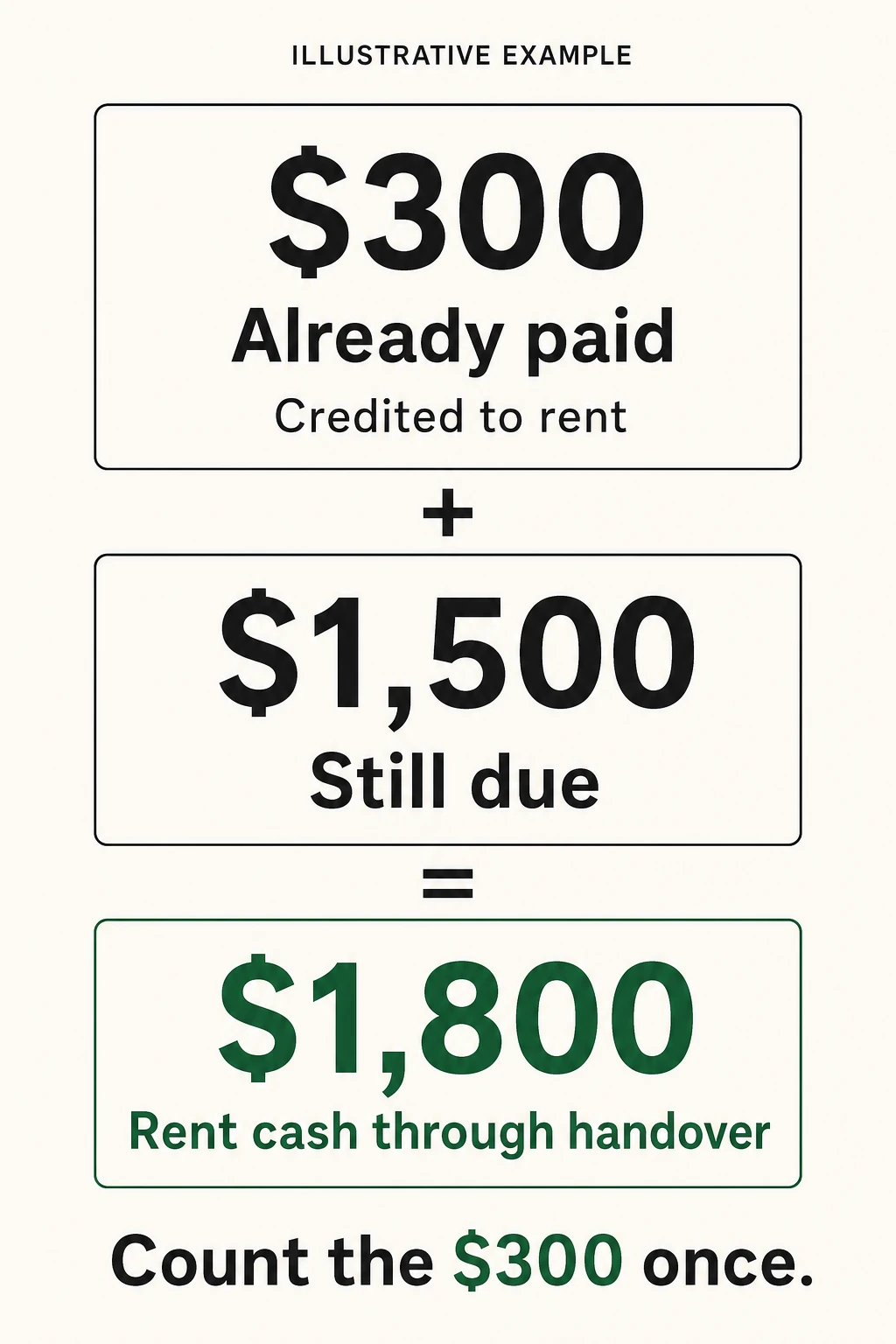
For a holding payment with unclear treatment, record the unresolved question and leave the affected cost input unconfirmed. Once its treatment is established, count that payment once in the appropriate category. Do not subtract a hoped-for refund from the cash you need through handover.
Turn tour notes into a next action
In Tours & Follow-ups, use one row for each contact or visit you want to retain. Repeating the Listing ID preserves the history without creating another apartment.
For example, one A001 tour row might contain:
| Field | Sample entry |
|---|---|
| Tour date / time | 2026-10-22, 5:30 p.m., America/Los_Angeles |
| Contact | Leasing office; official office email |
| Last contact date | 2026-10-21 |
| Follow-up due | 2026-10-23 |
| Response / tour status | Toured; waiting for fee breakdown |
| Observations | Bedroom faces courtyard; laundry is on ground floor |
| Unresolved questions | Is the quoted parking space assigned? |
| Action owner | Sam |
| Next action | Email office for assigned-parking answer |
Keep observations separate from answers you are still waiting for. Manager said window will be repaired belongs with its unresolved follow-up until you have the outcome you need. For a fuller question list, use our apartment viewing questions.
After a contact or tour, carry the current status and next task back into Listings. Update Costs when an answer changes a charge, along with its basis, source, and date. With roommates, naming an action owner avoids two follow-up emails from different people or none from anyone.
Share the tracker, not your identity documents
Keep Social Security numbers, ID scans, bank statements, passwords, and payment credentials out of the workbook. The Federal Trade Commission's rental scam guidance warns that fake listings can seek money and personal information. Record a listing or contact's verification status in Notes, with the basis and date, rather than copying private documents into the tracker.
If you share through Google Drive, set General access to Restricted and invite only your intended co-searchers. Give Editor access to someone entering details; Viewer or Commenter is enough for someone only reviewing. Anyone with the link can expose the file to people beyond your apartment hunt. In OneDrive, use a specific-people sharing option and the appropriate view or edit permission.
Keep one shared working file, avoid placing it in a broadly shared folder, and remove access when someone leaves the search. Limited sharing reduces exposure. Keeping sensitive data out of the file remains the safer starting point.
Keep the shortlist moving
The useful habit is small: add each exact unit once, leave unknown costs visibly unknown, and give every active option one next action. After each reply or tour, update the affected rows while the details are fresh.
If the tracker makes the choices clearer but the unanswered calls still pile up, start your search with us. We'll help with finding matches, calling properties, and booking tours while you keep control of the decision.